
Have you ever wondered how old you will be in the coming years, such as 2030, 2035, or even 2040?
Or do you want to know exactly how much time you have lived so far in terms of years, months, days, weeks, hours, and minutes?
Now, you don’t need to calculate everything manually.
Simply enter your Date of Birth and select the date up to which you want to calculate your age. Our Online Age Calculator will instantly calculate your age and provide a detailed breakdown of your total time.
You can use this tool not only to calculate your current age but also to find out how old you will be on any future date.
Let’s understand how to use this calculator step by step.
What Is an Online Age Calculator?
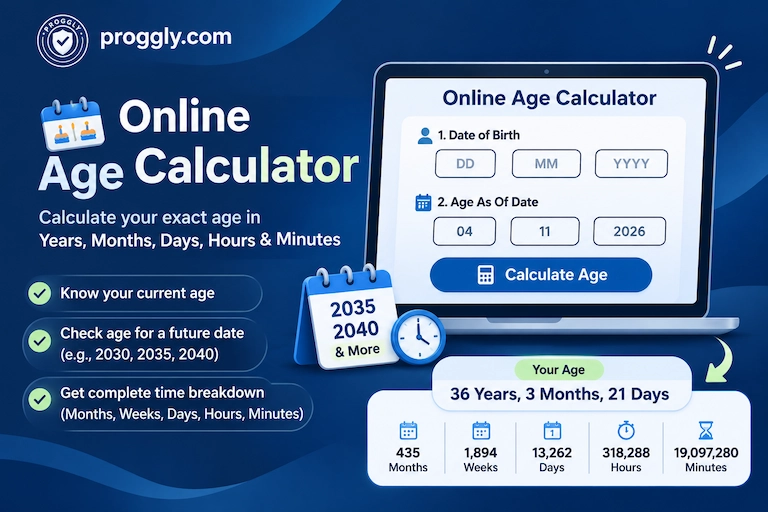
An Online Age Calculator is a free tool that helps you calculate your exact age between two dates.
You need to enter two important dates:
- Date of Birth: Your actual date of birth.
- Age As Of Date: The date up to which you want to calculate your age.
After entering both dates, click the Calculate Age button. The calculator will automatically calculate the difference between these two dates and display your age in years, months, and days.
It also provides a detailed time breakdown showing your total months, weeks, days, hours, and minutes.
How to Use the Online Age Calculator?
Using this calculator is very simple. Follow the steps below to calculate your current age or check your age on a future date.
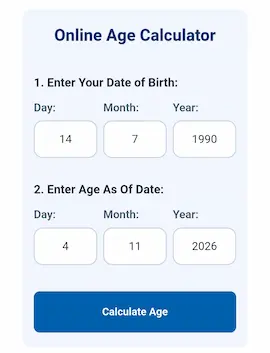
Step 1: Enter Your Date of Birth
First, go to the Online Age Calculator and find the section labelled “Date of Birth”.
You will see three input fields:
- Day (DD): Enter your birth day.
- Month (MM): Enter your birth month.
- Year (YYYY): Enter your birth year.
For example, if your date of birth is 15 August 1990, enter:
- Day: 15
- Month: 08
- Year: 1990
Make sure you enter your actual date of birth correctly.
Step 2: Select the Age As Of Date
Below the Date of Birth section, you will find another section labelled “Age As Of”.
This section allows you to choose the date up to which you want to calculate your age.
You can enter any date, depending on your requirement.
For example:
- To calculate your age today, enter today’s date.
- To check your age in 2030, enter a date in 2030.
- To check your age in 2035, enter a date in 2035.
- To check your age in 2040, enter a date in 2040.
You can also use the Calendar button to select a date instead of entering it manually.
Just like the Date of Birth section, you will see three fields:
- Day (DD)
- Month (MM)
- Year (YYYY)
Important: If you want to know your age in the future, enter your actual birth date in the first section and your desired future date in the second section. Do not change your original Date of Birth.
Step 3: Click the Calculate Age Button
Once you have entered both dates, click the blue “Calculate Age” button.
The calculator will process your dates and display your complete age result below the calculator.
You don’t need to perform any manual calculations.
What Information Does the Age Calculator Show?
After clicking the Calculate Age button, the tool displays your age in two different formats.
1. Your Exact Age
First, you will see your calculated age in the following format:
Years, Months, and Days
For example:
36 Years, 3 Months, and 21 Days
This tells you exactly how old you are on your selected date.
2. Complete Time Breakdown
Below your age result, you will find a detailed section called Time Breakdown.
This section provides additional information about the total time between your Date of Birth and the selected date.
The calculator displays:
- Total Months: The total number of months you have lived.
- Total Weeks: The total number of weeks between the two dates.
- Total Days: The total number of days you have lived.
- Total Hours: The approximate total number of hours.
- Total Minutes: The approximate total number of minutes.
For example, if your calculated age is 36 Years, 3 Months, and 21 Days, the result may also show:
- Total Months: 435 Months
- Total Weeks: 1,894 Weeks
- Total Days: 13,262 Days
- Total Hours: 318,288 Hours
- Total Minutes: 19,097,280 Minutes
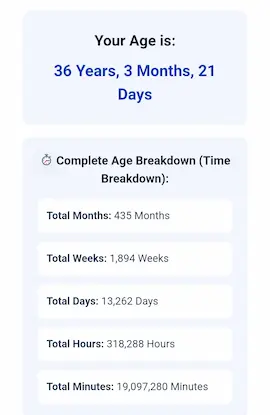
This detailed breakdown helps you understand your age beyond just years and months.
Calculate Your Future Age – Example
One of the most useful features of this calculator is that you can calculate your age on any future date.
Let’s understand this with an example.
Suppose your Date of Birth is 15 August 1990, and you want to know how old you will be on 15 August 2035.
Enter the following information:
Date of Birth:
- Day: 15
- Month: 08
- Year: 1990
Age As Of Date:
- Day: 15
- Month: 08
- Year: 2035
Now click the Calculate Age button.
The calculator will show your age as:
45 Years, 0 Months, and 0 Days.
In the same way, you can select any future date, such as 2030, 2040, or even a later year, to find out your age on that particular date.
Why Should You Use This Online Age Calculator?
Here are some useful reasons to use this calculator:
- Instant Results: Calculate your age within seconds without manual calculations.
- Future Age Calculation: Find out how old you will be in 2030, 2035, 2040, or any other future year.
- Detailed Time Breakdown: View your age in years, months, days, weeks, hours, and minutes.
- Easy to Use: Simply enter two dates and click the Calculate Age button.
- Calendar Support: Select dates using the built-in calendar option.
- Free Online Tool: Calculate your age without installing any additional software.
Frequently Asked Questions (FAQs)
1. Can I calculate my age in the future?
Yes. You can calculate your future age by entering your actual Date of Birth and selecting any future date in the Age As Of section.
2. Can I calculate my age in 2035 or 2040?
Yes. Simply enter your birth date in the first section and select a date in 2035 or 2040 in the second section. The calculator will show your age on that date.
3. What is the Age As Of Date?
The Age As Of Date is the date up to which you want to calculate your age. It can be today’s date, a past date, or a future date.
4. What details are included in the age calculation?
The calculator displays your exact age in years, months, and days. It also provides a detailed breakdown of total months, weeks, days, hours, and minutes.
5. Is this Online Age Calculator free to use?
Yes. You can use this Online Age Calculator for free without installing any application.
Conclusion
Calculating your age doesn’t have to be complicated. With this Online Age Calculator, you can easily find your exact age between any two dates.
Whether you want to know your current age, check how many days you have lived, or discover how old you will be in 2030, 2035, or 2040, this tool makes the calculation quick and simple.
Enter your Date of Birth, select your desired date, and discover your complete age breakdown in just one click!